What this tool measures
This page takes two dates that you choose and tells you how far apart they are. The answer comes in several forms at once: the total number of calendar days, a breakdown in years, months and days, the same span in weeks and days, the number of Monday-to-Friday business days, and the equivalent in hours.
It differs from the Date Calculator, which always starts from today and moves forward or back by an amount you type. Here both ends are yours to set, so it suits questions such as "How long was the project?", "How many days are left until the exam?" or "How many working days does this notice period cover?". When the page opens, the start is today and the end is 30 days later, so you can see how the result looks before changing anything.
How to count the days between two dates
- Set the Start date. You can type it or pick it from your browser's calendar.
- Set the End date. The order does not matter, and the arrow button between the fields swaps the two dates.
- Decide whether the last day counts. Leave Count the end date too unticked to measure the difference, or tick it to count both dates.
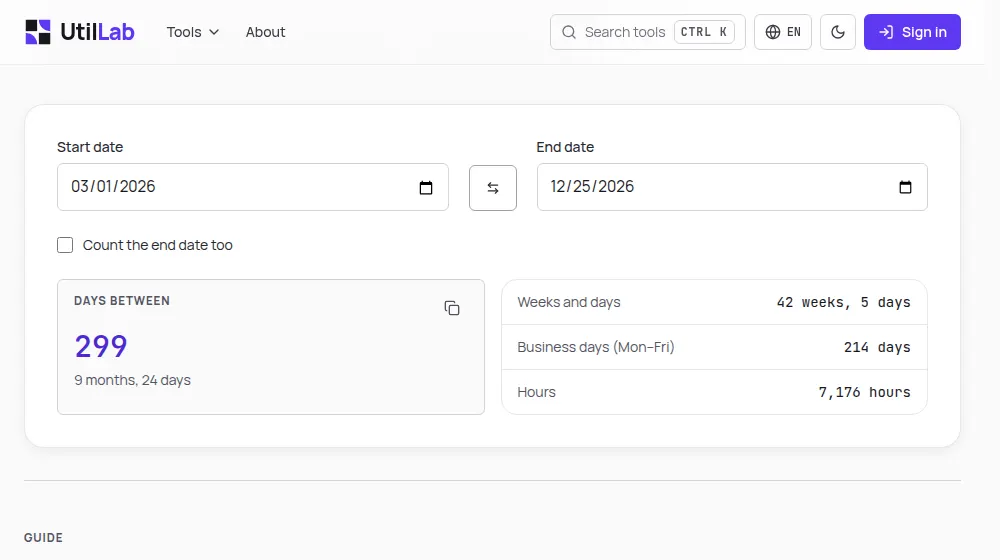
- Read the large number for the total in days, with the years-months-days breakdown beneath it, and the list on the side for Weeks and days, Business days (Mon–Fri) and Hours. The copy button copies a line such as "299 days (9 months, 24 days)".
With or without the end date
Unticked, the result is the plain difference between the dates: from 1 October to 3 October is 2 days. This is the right count for nights in a hotel, for the time that has passed between two events, and for most "how many days until" questions. Two identical dates give 0.
Ticked, both dates are counted, so the same example becomes 3 days. Use it for things that occupy whole days, such as a three-day conference, a leave that runs from the 1st to the 3rd, or a rental billed per calendar day. Two identical dates then give 1. The box changes every figure on the page, including the breakdown, the hours and the business days.
Worked examples
These results come from the same functions the page runs:
- 1 January to 1 March: 59 days in 2023 and 60 days in 2024, because 2024 has a 29 February. Both are shown as 2 months.
- 31 January to 1 March 2025: 29 days, shown as 1 month and 1 day. One month after 31 January lands on 28 February, and one more day reaches 1 March.
- 1 March to 25 December 2026: 299 days, or 42 weeks and 5 days, or 9 months and 24 days. That range holds 214 business days and 7,176 hours.
- 1 January to 31 December 2026 with the end date counted: 365 days, exactly 1 year, of which 261 are business days.
How business days are worked out
The tool walks through the range one day at a time and counts every Monday, Tuesday, Wednesday, Thursday and Friday. The earlier of the two dates is included when it is a weekday. The later date is included only when the end-date box is ticked, which keeps the business-day count consistent with the day count above it.
From Monday 9 November to Friday 13 November 2026 there are 4 business days (Monday to Thursday), or 5 with the box ticked. From Monday 9 to Monday 16 November there are 7 days and 5 business days. A range from a Saturday to the following Sunday has none.
Public holidays are not removed, because they differ from one country, state and city to another. Christmas Day 2026 is a Friday, so any range that covers it counts it as a business day. For payroll, legal deadlines or delivery estimates, subtract the holidays of the place that applies.
Months, weeks and hours: reading the breakdown
- Years, months and days are found by stepping forward from the earlier date one whole calendar month at a time and then counting the days that remain. Since months have 28 to 31 days, "1 month" can stand for 28, 29, 30 or 31 days; the total in days is the figure to rely on.
- Weeks and days divide the total by seven: 299 days are 42 full weeks and 5 days.
- Hours are the days multiplied by 24. The 23-hour and 25-hour days created by daylight saving time are not taken into account.
- Time zones do not affect the count, because the tool compares calendar dates and not moments in time.
Before you rely on a count
Contracts, leases, court rules and labour laws often say exactly how days are counted: whether the first day is excluded, whether the last day is included, and whether only working days count. This tool lets you see both inclusive and exclusive totals, and both calendar and business days, but it cannot know which rule your document uses. Read that rule first, then pick the matching figure. If you need a deadline counted forward from today rather than the gap between two dates you already know, the Date Calculator gives it in one step.