Why captions matter
Most people scroll through Reels, TikTok and Shorts with the sound off, in a queue, on a bus or late at night. Without captions they see someone talking and swipe away. Captions also help viewers who are deaf or hard of hearing, and those watching in a language that is not their first.
Typing captions by hand and timing each line takes longer than recording the video. This tool writes them from your speech, highlights each word as it is said in the style short videos use, and lets you check the text before the video is made.
How to use it
- Sign in with your free account and drop your video on the box above.
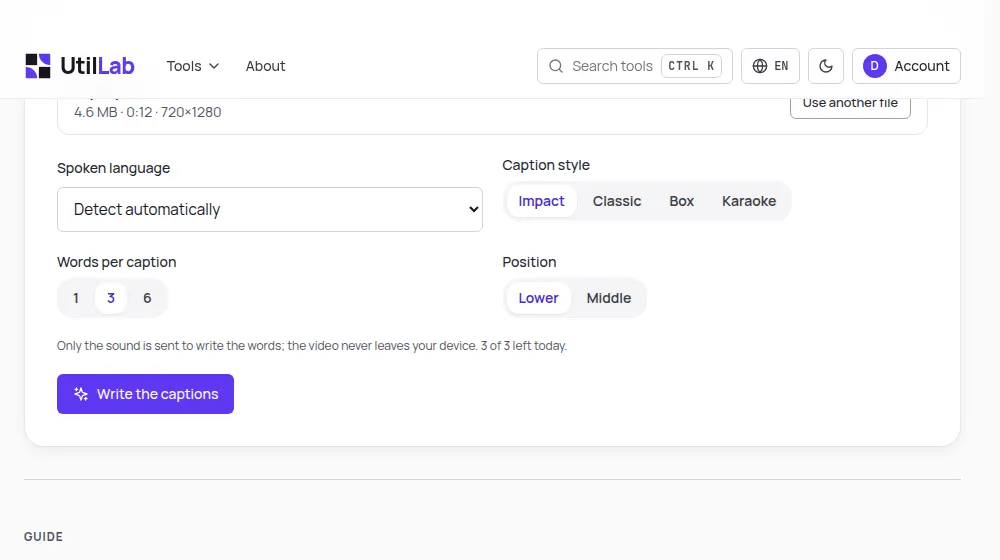
- Choose the spoken language, or leave it on automatic, and pick a style, the words per caption and the position.
- Press Write the captions: the page takes out the sound and our server writes down the words.
- Read the captions in the list and fix any word, then press Make the video.
- Watch the result and download the video, and the SRT or VTT file if you need it.
How it works
Your browser takes the sound out of the video and turns it into a small mono file at 16 kHz, about 2 MB a minute, which is all that is sent. On our server Whisper, an open-source speech recognition model, writes down each word with the moment it starts and ends. The sound is used only for that and is not kept.
Back in your browser the words are grouped into captions by the same rules as our AI video maker, and its engine draws them over every frame. The video is made on your device, so it is never uploaded, and its sound is copied into the new file unchanged.
Choosing the style
- Impact: large capital letters with a green highlight, the most common look on TikTok.
- Classic: clean lettering with a soft shadow, readable on any video.
- Box: a solid band behind the words, best over busy or bright footage.
- Karaoke: a coloured box moves from word to word, good for fast speech.
- Words per caption: 1 for a punchy one-word rhythm, 3 for most short videos, 6 for calmer explanations.
Limits to know
Speech recognition is very good with clear speech and can still mishear names, brands, slang and words drowned by music, which is why the review step comes before the video is made. Cleaning the voice first with the background noise remover improves the result on noisy recordings.
Each account has 3 captioned videos a day, plus 2 for each friend who joins through your invite link, because each one uses our server. Videos can be up to 15 minutes long; on a phone, up to 5 minutes and 150 MB.
Before you post
Captions work best on a tight video: the silence remover takes out the pauses first, so the captions keep moving. If your video is horizontal, the vertical video converter puts it on a 9:16 frame before you add the captions. And the AI video maker creates a complete captioned video from a single sentence when you have no footage at all.