What the silence remover does
Pauses make a video feel slow. Between sentences, while you look at your notes or think of the next point, a recording collects seconds where nothing happens, and on Reels, TikTok and Shorts viewers swipe away in those seconds. Editors cut them by hand with a technique called the jump cut, which takes a long time on a ten-minute recording.
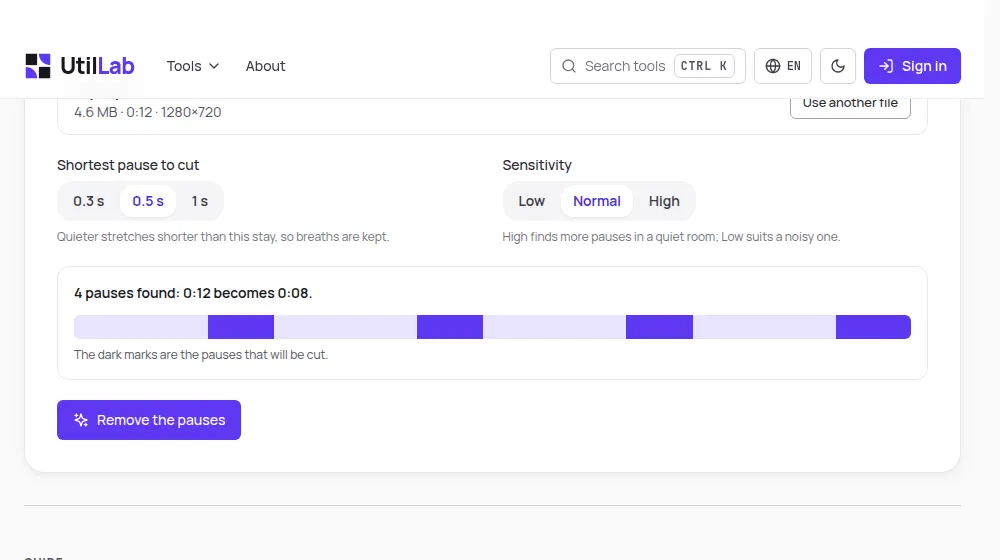
This tool does that first pass for you. It listens to the sound, finds every stretch where nobody is talking, shows them on a timeline and then makes a new file with only the parts where you speak, one after the other.
How to use it
- Drop your video or audio file on the box above, or choose it from your device.
- Wait a moment while the tool reads the sound and marks the pauses it found on the timeline.
- Change the shortest pause or the sensitivity if you want more or fewer cuts; the summary updates at once.
- Press Remove the pauses and follow the progress bar.
- Watch the result, check the new length, and download the file.
How the pauses are found
The tool measures the loudness of your sound every 10 milliseconds. Your quietest moments, with only the room in the background, set the floor; anything 14 dB louder counts as voice. Because the floor comes from your own file, the same settings work for a phone recording in a kitchen and for a studio microphone.
A quiet stretch is cut only when it lasts longer than the shortest pause you chose. Each cut keeps 0.12 seconds at both ends and the sound fades over 6 milliseconds, so words are not clipped and the joins do not click.
Choosing the settings
- 0.3 s: a fast rhythm for short social videos, where every gap goes.
- 0.5 s: the default, natural for explainers and talking-head videos.
- 1 s: only long silences go, good for lessons, interviews and podcasts.
- Sensitivity: High for a quiet room, Low when fans, traffic or music sit under the voice.
Limits to know
The tool works on sound, not on meaning: a long pause you made on purpose, for effect, is cut like any other. Music or loud background noise under the whole video can hide the pauses, and then fewer are found; cleaning the voice first with the background noise remover helps.
Everything happens in your browser, so the file size and length are limited to what a device can hold in memory: 500 MB and 15 minutes on a computer, 150 MB and 5 minutes on a phone. The new video is made at 30 frames per second and at most 1920 pixels on its long side.
After cutting
A video without pauses is often ready to post, but a few more steps make it work better on social media. If it was filmed horizontally, the vertical video converter puts it on a 9:16 frame. If the voice has hum or street noise, the background noise remover cleans it. And if you have no footage yet, the AI video maker turns one sentence into a complete short video.